Enabling semantic search
Categories:
This document is a guide on how to enable semantic search for PersonalMediaVault.
In order to enable semantic search for a vault, you need to perform 2 extra steps:
- Download an OpenClip embeddings models
- Enable semantic search by providing the path to the model
Download OpenClip embedding model
The OpenClip model is required in order to transform text and images into a single representation.
PersonalMediaVault needs a model compatible with OpenClip and ONNX.
We offer some models as zip files:
| Model | Size | Accuracy | Performance on CPU | Download |
|---|---|---|---|---|
MobileCLIP2-S2-OpenCLIP-ONNX | 405 MB | 77.2% | Fast (~70ms) | Mega |
MobileCLIP2-S3-OpenCLIP-ONNX | 1 GB | 80.7% | Fast (~110ms) | Mega |
ViT-SO400M-16-SigLIP2-384-ONNX | 4.6 GB | 84.1% | Slow (~1000ms), GPU recommended | Mega |
Other models
You can find more models in HuggingFace: https://huggingface.co/models?pipeline_tag=zero-shot-image-classification&library=onnx&other=clip
If you are wondering how to download the models from HuggingFace, you can use the hugging face CLI (hf) to download a model, example:
hf download --local-dir ./MobileCLIP2-S2-OpenCLIP-ONNX RuteNL/MobileCLIP2-S2-OpenCLIP-ONNX
Check this guide for more information: https://huggingface.co/docs/hub/main/en/models-downloading#using-the-hugging-face-client-library
You can also transform other OpenClip models in order to turn them into ONNX-compatible format. check this repository for more information: https://github.com/RuurdBijlsma/open-clip-inference-rs#other-models
Configuring semantic search
Using Docker
If you are using Docker, check the .env file and edit the necessary environment variables.
# Enable semantic search?
# This option can be YES or NO
# If set to YES, make sure to also set the model
SEMANTIC_SEARCH_ENABLED=NO

# OpenCLIP model path
# First, download a model (you can find models in Hugging face)
# Hugging face search link: https://huggingface.co/models?pipeline_tag=zero-shot-image-classification&library=onnx&other=clip
# Change this variable to point to the model folder
SSE_MODEL_PATH=./open-clip-model

# Max size for images before they cannot be longer encoded
# The size is set in MegaBytes (no decimals allowed)
# This limits the memory usage of the daemon
# If you plan to work with very large images, make sure to set this to a high value
SSE_IMAGE_SIZE_LIMIT_MB=20
Using the launcher
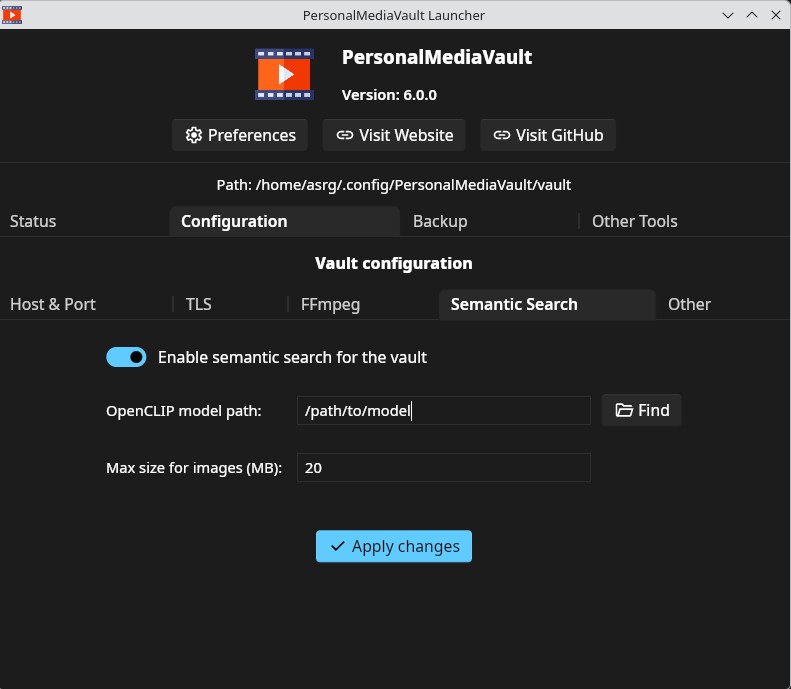
If you are running PersonalMediaVault with the launcher, go to Configuration -> Semantic Search, enable the semantic search toggle and select the folder where you downloaded the model.